To uninstall Claude Code on a Mac, remove the program the way it was installed: rm -f ~/.local/bin/claude and rm -rf ~/.local/share/claude for the native installer, brew uninstall --cask claude-code for Homebrew, or npm uninstall -g @anthropic-ai/claude-code for npm. That removes only the program. Your settings, chat history and plugins stay in ~/.claude and ~/.claude.json. On my Mac the uninstall would free 1.2 GB and leave 7.7 GB.
If you'd rather use an app for the cleanup, see which Mac cleaners handle developer folders.
Step 1: find out how it's installed
There are three ways Claude Code gets onto a Mac, and each has its own uninstall. This shows every copy on your path:
$ which -a claude| It prints | You have |
|---|---|
~/.local/bin/claude | The native installer |
a path under /opt/homebrew | Homebrew |
| a path under an npm or node folder | npm |
Two lines mean two installs. Remove both, or claude will still run.
Step 2: remove the program
Native installer:
$ rm -f ~/.local/bin/claude
$ rm -rf ~/.local/share/claude
Homebrew (use claude-code@latest if that's the cask you installed):
$ brew uninstall --cask claude-codenpm:
$ npm uninstall -g @anthropic-ai/claude-codeThese are the commands from Anthropic's own setup page. If claude still runs afterwards, you have a second install or an old shell alias.
Step 3: decide about what's left
The uninstall stops there. Everything Claude Code wrote while you used it is still on the disk. Here's my Mac on 16 November 2026, after about six weeks of daily use:
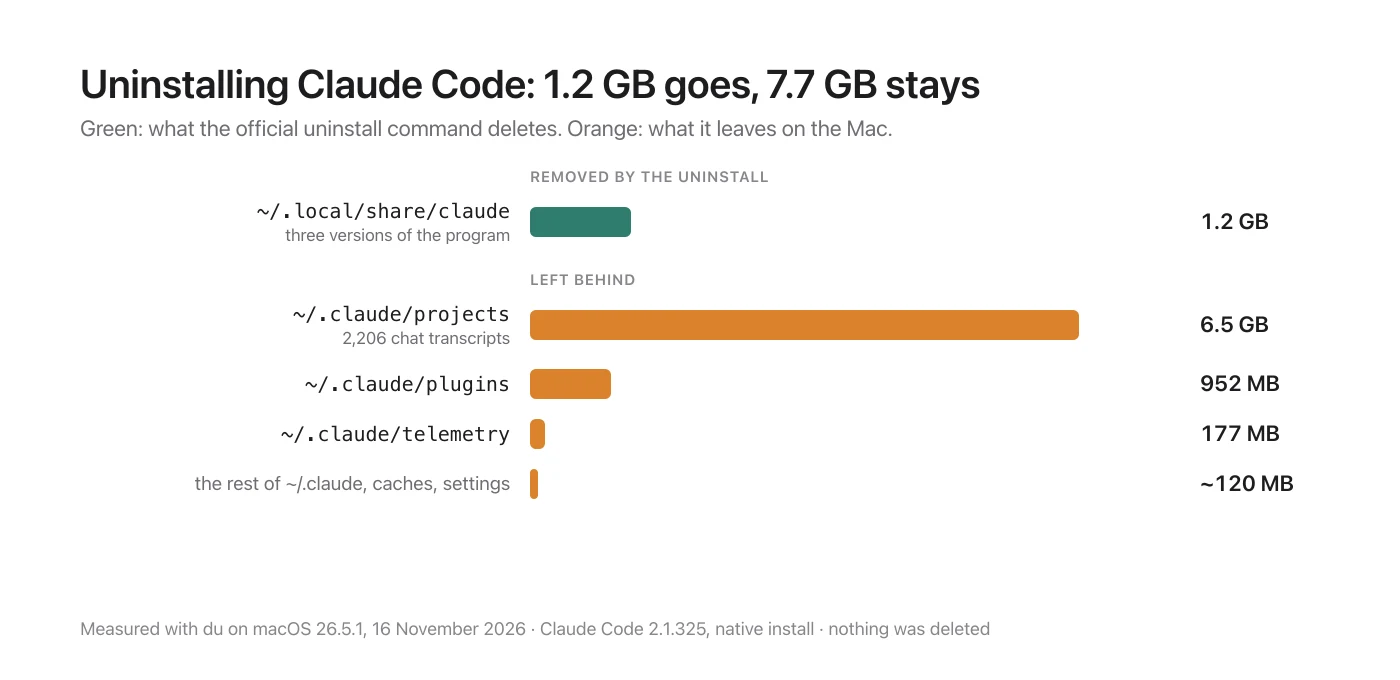
| Path | Size | What it is | Removed by the uninstall |
|---|---|---|---|
~/.local/share/claude | 1.2 GB | The program: three versions, about 320 MB each | Yes |
~/.claude/projects | 6.5 GB | 2,206 chat transcripts in 72 project folders | No |
~/.claude/plugins | 952 MB | Installed plugins and their cache | No |
~/.claude/telemetry | 177 MB | Usage logs | No |
the rest of ~/.claude | about 120 MB | Settings, skills, file history, shell snapshots | No |
~/Library/Caches/claude-cli-nodejs | 9.7 MB | A cache | No |
~/.claude.json and its backups | under 1 MB | Account state and per-project settings | No |
To remove the settings and history as well, Anthropic's page gives these:
$ rm -rf ~/.claude
$ rm ~/.claude.json
This deletes your settings, allowed tools, MCP server setup and all session history. It also deletes anything you added yourself: skills, memory files and a global CLAUDE.md. If you might come back, copy ~/.claude/settings.json, ~/.claude/CLAUDE.md and ~/.claude/skills somewhere first.
Two small leftovers aren't on Anthropic's page. They're safe to remove:
$ rm -rf ~/Library/Caches/claude-cli-nodejs ~/.local/state/claudeStep 4: the files in your projects
Claude Code also writes into the projects you used it in: a .claude folder, and sometimes a .mcp.json. I found 23 .claude folders under my projects folder. This lists yours without deleting anything:
$ find ~/Projects -maxdepth 3 -name .claude -type dLook before you delete. In a shared repository these files may be committed on purpose, because they hold the team's settings for the project.
If ~/.claude comes back
Then something else is still using it. Anthropic's page says the VS Code extension, the JetBrains plugin and the Claude desktop app all write to ~/.claude, and recreate it the next time they run. Uninstall those first.
The desktop app is a separate thing: /Applications/Claude.app, with its data in ~/Library/Application Support/Claude. On my Mac that folder was 12 GB, and 9.6 GB of it was one subfolder, vm_bundles. Removing the command-line tool doesn't touch any of it.
If you only want the space back
You don't have to uninstall to get most of it. The 6.5 GB of transcripts is the bulk, and old ones can go while you keep using Claude Code. The AI coding tools disk space guide covers which parts clean themselves up and which don't.

Sources
- Anthropic, Claude Code docs, "Set up Claude Code": the uninstall commands for the native installer, Homebrew and npm, the "Remove configuration files" step, and the note that the VS Code extension, JetBrains plugin and desktop app recreate
~/.claude. Read on 16 November 2026. - Measured on this Mac on 16 November 2026 (macOS 26.5.1, Claude Code 2.1.325, native install):
duon each path, a count of transcripts and project folders in~/.claude/projects, and a count of.claudefolders under~/Projects. Nothing was deleted, and Claude Code was not uninstalled. - Shedi's rules for agent leftovers and its uninstaller.