Other Users & Shared is the space in /Users that isn't your own home folder: other accounts' home folders, /Users/Shared, and /Users/Deleted Users. To see what's in it, run sudo du -sh /Users/* in Terminal. To shrink it, delete accounts nobody uses in System Settings › Users & Groups, delete old disk images in /Users/Deleted Users, and clear what you don't need from /Users/Shared. It's a category, not a folder, so there's no single thing to empty.
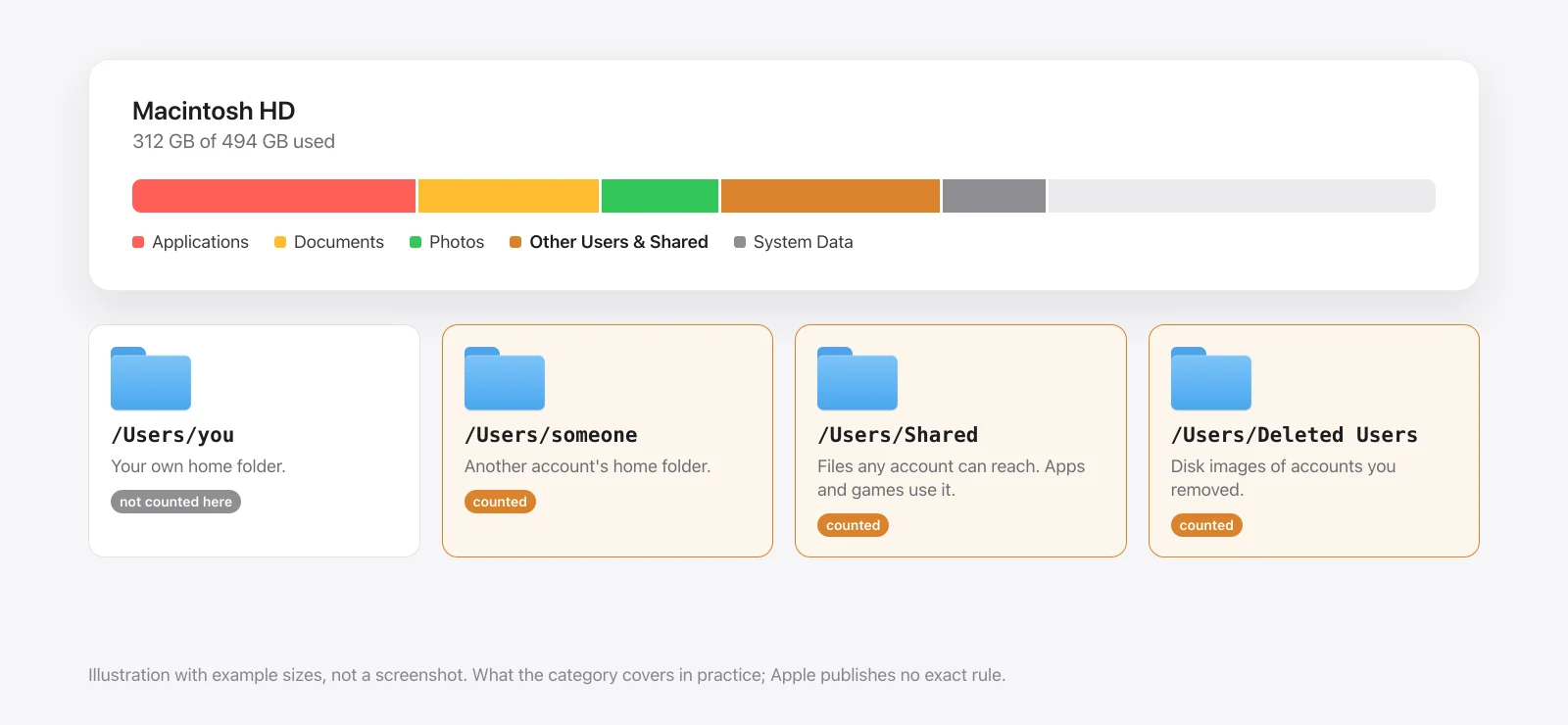
What it counts
Open System Settings › General › Storage and the bar shows a segment called Other Users & Shared. Apple doesn't publish the exact rule, but in practice it's everything in the /Users folder except your own home folder:
| Folder | What's in it | Shows up when |
|---|---|---|
/Users/<name> | Another account's home folder: their documents, photos, Library | Someone else has an account on this Mac, or once had one |
/Users/Shared | Files every account can reach | An app or game installed something for all users |
/Users/Deleted Users | Disk images of removed accounts | You deleted an account and chose to keep its files |
That's why the name confuses people who live alone with their Mac. The "Other Users" half needs a second account. The "Shared" half doesn't.
See what's in yours
This lists every folder in /Users with its size. It asks for your admin password, because macOS won't let one account read another's files. It only reads:
$ sudo du -sh /Users/*Then look inside Shared, biggest last:
$ du -sh /Users/Shared/* | sort -hOn my Mac on 16 November 2026, with one account, this is all there was:
$ du -sh /Users/Shared
#  92K  /Users/Shared
92 KB: a Relocated Items folder at 56 KB and an Adobe folder at 32 KB. So a Mac with one user and no shared installs has close to nothing here. If yours shows gigabytes, one of the three causes below is the reason.
Cause 1: an account nobody uses
A second account is the usual reason for a big number. A family member's old login, an account from a previous job, a test account: each has a full home folder with its own documents, photos and Library.
- Sign in to the other account once if you can, and check there's nothing in it anyone wants.
- Open System Settings › Users & Groups.
- Click the ⓘ next to the account, then Delete User.
- Choose what happens to its files:
- Save the home folder in a disk image keeps everything, and frees no space yet.
- Don't change the home folder leaves it in
/Users, and frees no space. - Delete the home folder removes it, and frees the space.
Deleting a home folder is permanent, and it isn't your data. If the account belonged to someone else, ask them, or pick the disk image first and delete that later.
Cause 2: the Deleted Users folder
If an account was removed with "Save the home folder in a disk image", its files are still on the disk as a .dmg:
$ ls -lh "/Users/Deleted Users"Each image is named after the account. Double-click one to open it and copy out anything you want, then move the image to the Trash and empty it. Apple describes this folder in its guide to restoring a deleted user.
Cause 3: big things in /Users/Shared
/Users/Shared exists so files can be used from every account. Some apps use it for the same reason:
- Games and launchers that install for all users often keep the whole game there.
- Virtual machines from Parallels can live in
/Users/Shared/Parallels. - Creative apps such as Adobe's keep shared settings and content there.
Relocated Itemsappears after a macOS upgrade, holding files the installer couldn't put back. Apple says you can delete it once you've checked what's inside.
Work from the du list: find the biggest folder, work out which app owns it, and remove it the app's way (uninstall the game, delete the virtual machine from Parallels).
Things inside /Users/Shared that belong to an app you've already uninstalled are safe to move to the Trash.
What not to do
- Don't delete
/Users/Shareditself. macOS and apps expect the folder to exist. - Don't delete another account's folder from Finder or Terminal. Remove the account in Users & Groups, so macOS removes the login as well as the files.
- Don't expect a cleaner app to do this for you. Other accounts' files are protected from your account on purpose.

If the number that worries you is a different segment, see System Data huge on Mac? or how to free up space on a Mac.
Sources
- Measured on this Mac on 16 November 2026 (macOS 26.5.1, one user account):
duon/Users/Sharedand its contents. Nothing was deleted. - Apple Support: "Restore a deleted user on Mac" (the
/Users/Deleted Usersfolder and its disk images) and the Users & Groups options for deleting a user. - Apple Support: "If you see a Relocated Items folder on your Mac".
- Not checked for this guide: the exact rule macOS uses for this storage category (Apple doesn't publish one), and each game launcher's default install folder.