
Install diskreceipt with brew install abdiraimov-otabek/tap/diskreceipt and run diskreceipt in Terminal. It prints a receipt of the developer caches on your Mac, from Xcode DerivedData, node_modules, Python .venv folders and Docker to the npm, uv, Gradle and Homebrew caches. Each line is labeled safe, check or keep and comes with the official command to clean it. It only reads and never deletes anything.
What diskreceipt is
The Storage screen in System Settings shows developer caches as one large "System Data" number and stops there. diskreceipt is the itemized version: a free, open-source Bash script that weighs about 30 known cache folders and every project folder under your home folder, then prints the result as a thermal receipt.
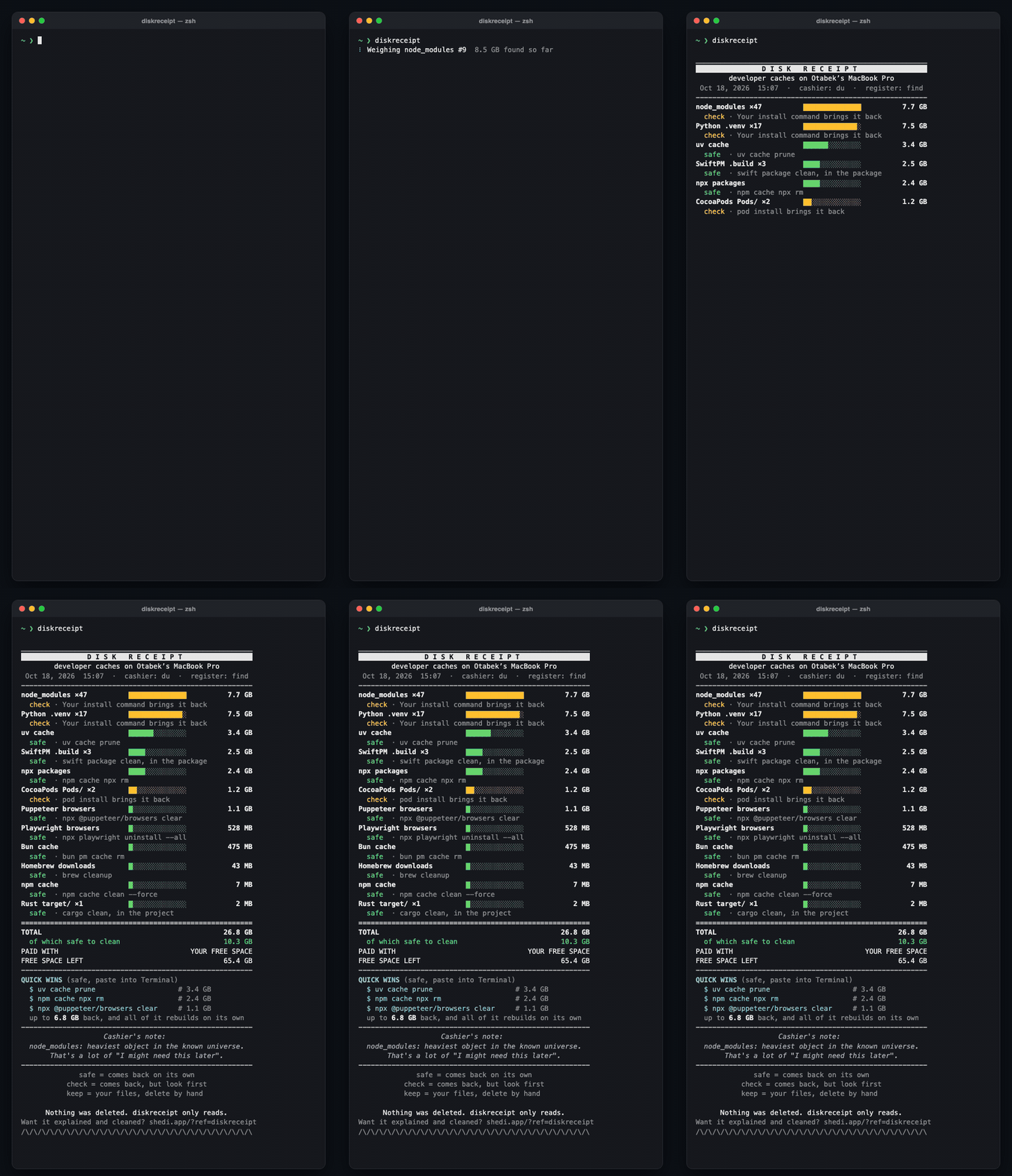
That's a real run on a developer Mac. The total was 26.8 GB: 47 node_modules folders took 7.7 GB, 17 Python .venv folders took 7.5 GB, and 10.3 GB of it was cache that rebuilds on its own.
Install
With Homebrew:
$ brew install abdiraimov-otabek/tap/diskreceiptWithout Homebrew, download the script and make it executable:
$ curl -fsSL https://raw.githubusercontent.com/abdiraimov-otabek/diskreceipt/main/diskreceipt -o /usr/local/bin/diskreceipt
$ chmod +x /usr/local/bin/diskreceipt
It's one script with no dependencies, and it runs on the Bash that ships with macOS. Check it with diskreceipt --version. Update it with brew upgrade diskreceipt, and remove it with brew uninstall diskreceipt.
Run your first scan
$ diskreceiptA spinner shows what's being weighed and a running total, so you know it isn't stuck. The known cache folders take a second or two. Searching your home folder for project folders takes most of the time, about 20 seconds on a typical developer Mac. Then the receipt prints line by line, biggest item first.
Press Control-C at any time. Nothing has changed, because diskreceipt only reads.
How to read the receipt
Each item takes two lines. The first has the name, a bar showing its size compared with your biggest item, and the size. A count like ×47 means 47 folders of that kind were found and added up. The second line has the label and how to clean it.
| Label | What it means | What to do |
|---|---|---|
| safe | A cache. It rebuilds on the next build or install. | Clean it whenever you need the space. |
| check | Comes back, but only after a reinstall. | Clean it for projects you no longer work on. |
| keep | Your own files. They don't come back. | Only delete them if you're sure, by hand. |
Below the items, TOTAL adds up every line. of which safe to clean adds up only the safe ones. FREE SPACE LEFT is the free space on your startup disk.
A project folder only counts when its marker file sits next to it: package.json for node_modules, Cargo.toml for target/, Package.swift for .build and Podfile for Pods/. A random folder called target is ignored, and nested node_modules are counted once.
Clean the quick wins first
The receipt ends with QUICK WINS: the three biggest safe items that have an official one-line command, ready to paste. On the Mac above they were:
$ uv cache prune
$ npm cache npx rm
$ npx @puppeteer/browsers clear
Together they were worth up to 6.8 GB. It says "up to" because some commands, like uv cache prune, only remove the parts no project uses.
Quick wins only ever include safe items, caches that the tool which made them rebuilds on its own. The cost is a slower first build or install afterwards.
After that, work through the rest of the receipt by tool. Each one has its own guide:
- Xcode: DerivedData, simulators, DeviceSupport and Archives in How to clear Xcode DerivedData and old simulators.
- JavaScript:
node_modulesand the npm, pnpm, Yarn and Bun caches in Delete node_modules safely. - Docker: run
docker system dfbefore you prune anything. The details are in Reclaim Docker disk space on a Mac. - Everything else: Python, Rust, Go, Gradle, Android and editors in Every developer cache you can safely delete on macOS.
check items like node_modules and .venv come back only when you reinstall. Remove them for projects you've finished with, not the one you're working on today.
Run diskreceipt again afterwards to see the new total.
Scan less, scan faster
| You want | Run |
|---|---|
| Global caches only, about 1 second | diskreceipt --no-projects |
| Only the projects in one folder | diskreceipt --root ~/code |
| A shallower project search | diskreceipt --depth 3 |
| The receipt at once, no animation | diskreceipt --no-anim |
| No colors | diskreceipt --no-color |
--depth counts folder levels below --root (6 by default). The project search always skips ~/Library, the Trash, .git, .cache, .npm and .cargo, because the caches inside those are already on the known-cache list.
Keep a history
When you redirect the receipt to a file, it's plain text with no colors and no animation:
$ mkdir -p ~/receipts
$ diskreceipt > ~/receipts/$(date +%F).txt
Save one a month and compare two of them with diff to see which caches grow back fastest. To print only the total, run diskreceipt --no-projects | grep '^TOTAL'.
Troubleshooting
The scan seems slow. Almost all the time goes into the project search. Narrow it with --root ~/code or --depth 3, or skip it with --no-projects.
A folder you know about is missing. Check these in order:
- Items under 1 MB are left off.
- A project folder needs its marker file next to it.
- It may sit deeper than
--depth, or outside--root.
The sizes don't match Finder. diskreceipt uses du, which counts disk blocks in use. Finder can show the logical size, which is larger for sparse files like Docker's disk image. du is closer to what deleting would actually free.
macOS asks whether Terminal can access data from other apps. That can happen when diskreceipt measures Docker Desktop's disk image, which lives in Docker's app container. If you deny it, the Docker line is left off and everything else still works.

Sources
- diskreceipt on GitHub (source, MIT license, step-by-step guide)
- Homebrew tap for diskreceipt
man duandman findon macOS